

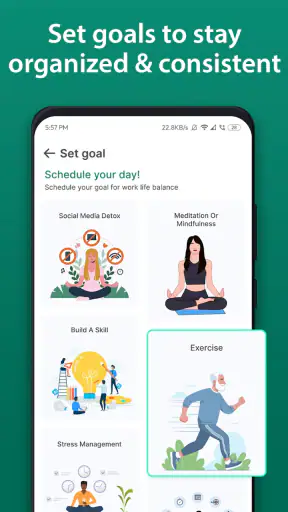
I spent time using Calendar 2026 as a practical planning tool rather than treating it as just another date grid. It is a free productivity app from Vruksh Raj, built around organizing tasks, appointments, schedules, and follow-up notes after calls. That combination gives it a more useful role than a simple calendar, especially if your day is split between personal reminders, meetings, and small actions that are easy to forget once a conversation ends.
My first impression was that its appeal is straightforward: it tries to keep planning and follow-up work in one place. I do not need a separate notebook for an appointment, a second reminder app for the task that comes from it, and a third place to record what I promised during a phone call. The idea is simple, but it addresses a real everyday problem: remembering what happens after something has been scheduled.
How the calendar fits into everyday planning
The app sits in the productivity category and is suitable for Everyone, which makes its purpose easy to understand. It is not presented as a specialist business system or a complicated project-management platform. I see it as a lightweight organizer for people who want a clearer view of upcoming commitments without building an elaborate workflow around them.
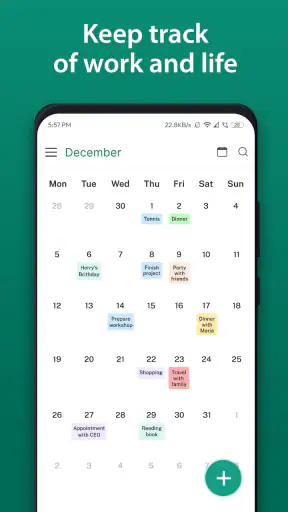
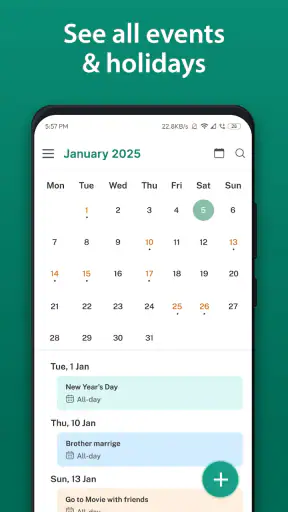
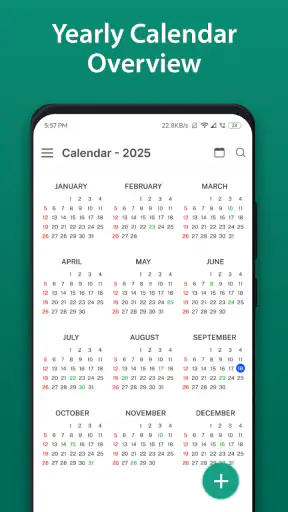
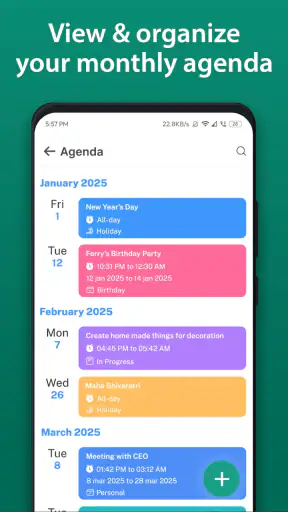
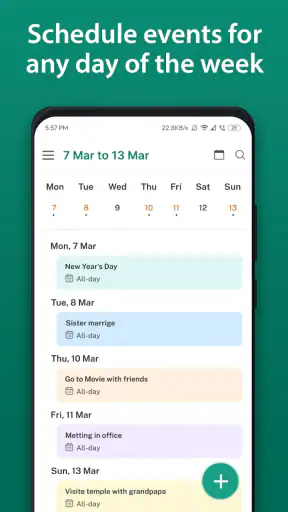
The calendar view is most useful when I begin with the question, “What needs my attention next?” Appointments provide the fixed points in the day, while tasks fill in the work around them. That distinction matters. A meeting at a particular time is not the same as preparing for it, sending a follow-up, or checking an item later. Keeping those ideas close together makes planning feel more realistic than filling a calendar with events and hoping I remember the associated work.
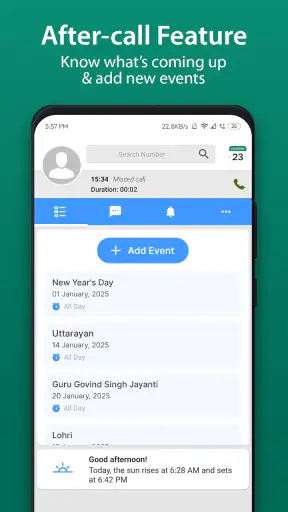
The aftercall feature is the most distinctive part of the concept. After a phone conversation, I can think in terms of the next action instead of relying on memory. For example, if a call ends with a request to send a document, confirm a detail, or check back later, recording that follow-up immediately is more dependable than telling myself I will remember it. The strongest workflow is not the call itself, but the small action captured before the conversation disappears from my attention.
This also works outside office use. A parent could note an appointment and then add a task to bring a form. Someone arranging home repairs could record a call and create a reminder to confirm the visit. A student could place a deadline on the calendar and attach preparation tasks around it. These are modest examples, but they show where the app earns its place: in the gap between an event and the work required to make that event go smoothly.
A realistic day with appointments and follow-up work
Imagine a weekday with a morning appointment, a midday call, and an errand that must be completed before the evening. I would first place the appointment in the schedule, then add the preparation task instead of assuming the event alone is enough. After the call, I would use the aftercall workflow to record the next step while the details were still fresh. Later, the calendar gives me a single place to review both the fixed commitments and the actions that grew out of them.
That approach is more useful than writing “call completed” and moving on. A completed call may create several responsibilities, and the value of the app depends on capturing those responsibilities while they are still clear. I found that this habit reduces the mental load of repeatedly replaying conversations in my head. It also makes the next review of the day more actionable: I am not only looking at where I need to be, but also what I need to do because of what already happened.
A useful tip is to keep follow-up wording specific. “Handle client matter” is too vague to help later. “Send the requested file” or “confirm the appointment time” gives the task a clear starting point. The app cannot decide the next action for me, so the quality of the reminder depends on how precisely I write it. That is an important trade-off: the tool supports good planning, but it does not replace the judgment needed to define the work.
Where it differs from an ordinary calendar
A basic calendar is excellent for showing when something happens. It is less helpful when the important part is what must happen before or after it. Calendar 2026 aims to bridge that gap by placing tasks, appointments, and aftercall planning in the same productivity experience. I would choose it over a bare date-book app when my schedule regularly creates follow-up work.
It is also different from a full task-management system. Dedicated task tools usually make it easier to build large lists, organize complex projects, and manage many layers of work. This app feels more appropriate when the schedule is the center of the day and tasks are connected to those dates and conversations. If I were coordinating a large team or tracking a long project with dependencies, I would want a more specialized system. For personal planning and straightforward follow-through, the calendar-led approach is easier to keep understandable.
Compared with writing everything in a paper planner, the app offers quicker changes when plans move. An appointment can be adjusted without crossing out a page, and a follow-up can be recorded at the moment it becomes relevant. Paper still has advantages for people who think better by handwriting or want their planning completely separate from a phone. The better choice depends on whether flexibility and immediate capture matter more to you than the physical feel of a notebook.
What the free price means for its value
Calendar 2026 is free, so the basic value question is simple: there is no purchase price standing between a curious user and trying the workflow. I appreciate that because this type of app is highly personal. A planner can look useful in theory but fail to fit the way someone actually organizes a day. Free access makes it possible to test the calendar, task, and aftercall combination without committing money first.
That does not mean every user will find it equally valuable. Free access is most worthwhile when I consistently record follow-ups and review the schedule. If I only open the app occasionally to check a date, its broader planning idea may not change much. The value comes from adopting a habit, not from merely installing it.
Its audience size suggests that the concept has found a substantial user base: the app has more than a million installs and an average rating of 4.6 from around eight thousand ratings. Those figures do not guarantee that it will suit my personal routine, but they do make it easier to treat the app as an established option rather than an obscure experiment. It has also received 151 written reviews, which adds some context beyond the headline rating.
The developer is Vruksh Raj, and the current release is version 1.3.9. The app was released on June 16, 2024, and requires Android 10 or later. That operating-system requirement is worth checking before installation, particularly if I am using an older phone. For compatible devices, the free entry point keeps the decision low-risk; for an incompatible device, the app is simply not a practical choice regardless of its planning approach.
The friction points I would consider first
The app’s focused design can also feel limiting if I expect a complete productivity suite. A calendar-centered workflow is not automatically the best place for detailed project planning, deep note-taking, or team coordination. I would not choose it as my only organizational tool for a complicated work environment unless its task handling matches the exact level of structure I need.
There is also a discipline cost. The aftercall feature is useful only if I remember to use it immediately and write a meaningful next step. If I postpone the note, the moment has already passed and the feature loses much of its advantage. This is not a flaw unique to the app, but it is a genuine practical limitation: the workflow asks for a small amount of attention at the end of every relevant call.
Another trade-off is the risk of placing too much into one calendar. When appointments, errands, reminders, and follow-up tasks all appear together, a busy day can become visually crowded. I would avoid turning every minor thought into a scheduled item. A better approach is to reserve calendar space for commitments and time-sensitive actions, while keeping wording short enough to scan quickly. The app can support clarity, but careless entry can produce the opposite.
People who need advanced collaboration should think carefully before switching from a dedicated service. A shared family schedule, a team task board, or a project system may offer stronger tools for multiple users and larger workflows. Calendar 2026 makes more sense for an individual who wants personal control and a direct connection between events and follow-up actions.
Small habits that make the workflow better
I would start by using the app for one type of follow-up rather than transferring an entire planning system at once. Phone calls are a good starting point because the aftercall idea has a clear trigger. Once that feels natural, I would add appointment preparation and post-appointment actions. This staged approach prevents the calendar from becoming a dumping ground during the first few days.
For appointments, I would separate the event from the preparation. If I need to bring something, read something, or arrive early, I would record that as its own task. This makes the schedule more honest. The appointment shows the fixed time, while the task shows the effort needed to be ready. That separation is one of the more useful insights in the app’s design and is easy to miss if I use it only as a date viewer.
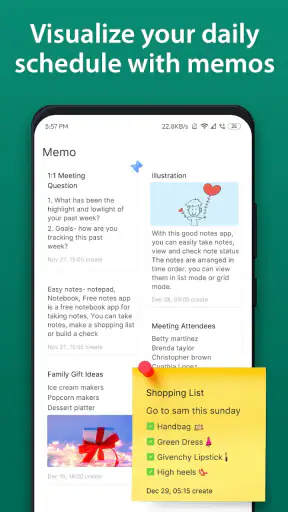
For calls, I would capture one clear next action before adding extra detail. If the conversation produces several responsibilities, I would record them as separate tasks rather than hiding them in a long note. That makes later review faster and reduces the chance that an important action will be buried inside a paragraph. It also gives me a better sense of what can realistically fit into the day.
I would review the next day at the end of the current one. The purpose is not to create an elaborate routine; it is to notice whether a follow-up has a sensible place. A task without a realistic time or priority can remain permanently postponed. Looking ahead helps me move it, simplify it, or decide that it no longer matters.
One further trade-off is the balance between immediate capture and later cleanup. Recording every detail during a call may interrupt the conversation, while recording nothing creates memory risk. My preference is to jot down a short action immediately and refine it afterward. That gives the aftercall workflow a practical middle ground: fast enough not to disrupt the call, but specific enough to protect the important next step.
Who is most likely to benefit
I think the app is a strong fit for people whose days contain many small commitments rather than one large project. Freelancers, students, parents, service workers, and anyone managing appointments alongside errands can benefit from seeing events and related actions together. It is especially useful for someone who often finishes a call or meeting with good intentions but later forgets what was agreed.
It may also suit users who find full productivity systems intimidating. The central idea is easy to explain: put the appointment on the calendar, add the task around it, and record what comes next after a call. That is less demanding than building a complex database of projects, labels, and dependencies. The app gives structure without requiring me to become a productivity hobbyist.
I would recommend trying it for a week with a specific goal: capture every meaningful follow-up from calls and appointments. That test reveals more than browsing the interface. If the habit reduces forgotten actions, the app is delivering real value. If I still prefer a separate task list or paper planner after that trial, forcing the calendar into my routine would not make sense.
On the other hand, I would skip it if my main need is shared project management, extensive collaboration, or highly detailed task hierarchies. I would also skip it if I dislike entering information on a phone or if my planning method depends on handwriting. The fact that it is free removes the financial barrier, but it does not remove the need for a comfortable personal fit.
My recommendation after using it
My overall view is positive, with a clear condition: Calendar 2026 is most valuable when I use it as a bridge between scheduled events and the actions they create. Its free price makes experimentation easy, its Everyone rating keeps the audience broad, and its combination of planning and aftercall follow-up gives it a more specific purpose than a generic calendar.
I would recommend it to a friend who wants a simple way to stop losing track of post-call promises, appointment preparation, and small time-sensitive tasks. I would not present it as a replacement for every productivity tool. People with complex team workflows or demanding project structures may be better served by specialized alternatives.
The final decision is therefore uncomplicated. Try it if your biggest planning problem is not knowing the date, but remembering what to do because of that date or conversation. Skip it if you need collaboration-heavy project control or prefer a fully manual planner. For the right user, the free access and focused aftercall workflow make it a practical experiment with very little downside, provided the user is willing to turn captured reminders into a regular daily habit.


